Click the Rank button from the Individual Advancement summary page to maintain a scout's rank advancement, as shown below.
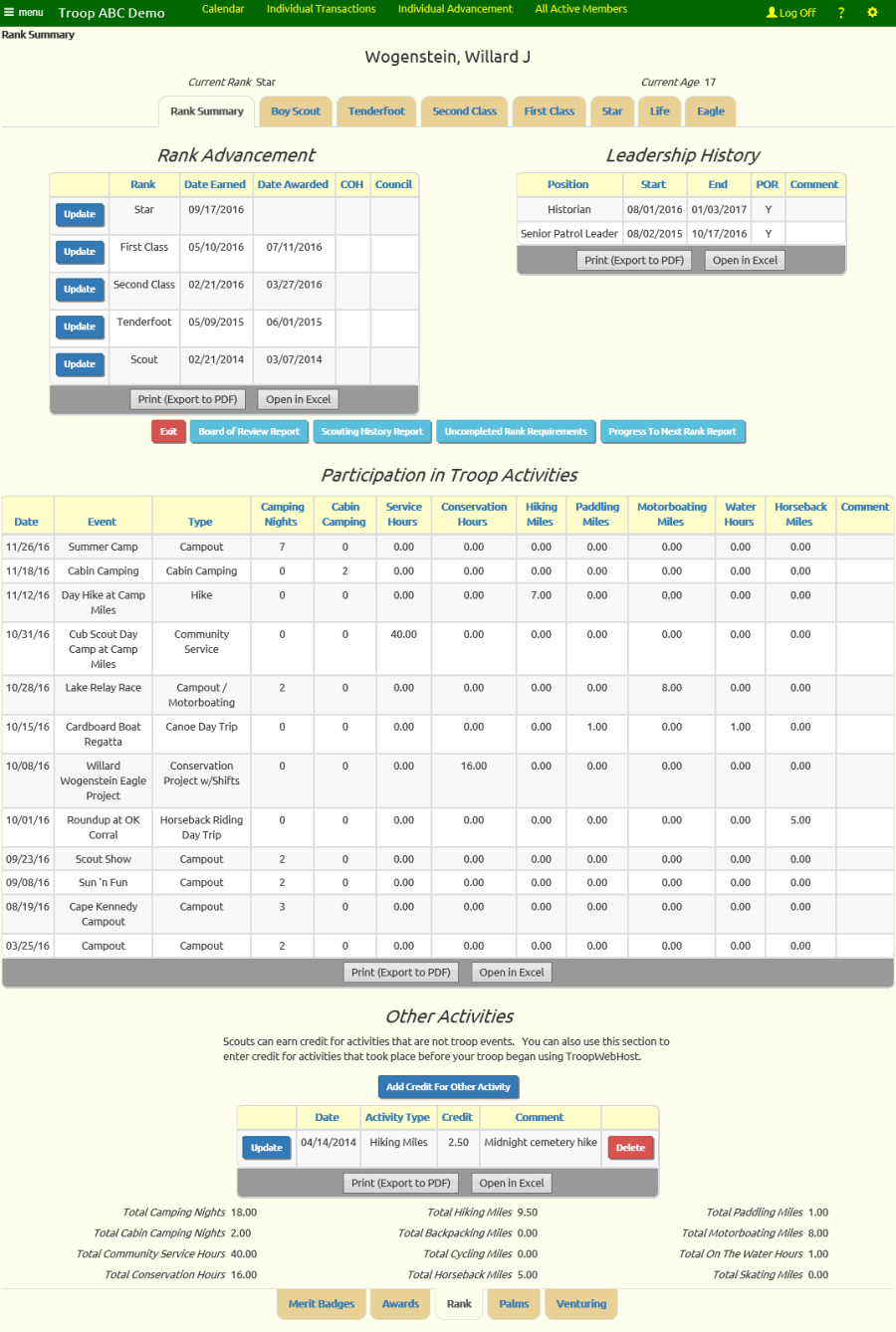
There are eight tabs across the top of this page that will take you to each of the scout ranks.
The first tab is the Rank Summary tab.
The information on this tab includes:
- This scout's rank advancement dates
- Leadership positions held by this scout
- Button to produce the Board of Review Report for this scout's next rank
- Button to produce the Scouting History Report for this scout
- Button to produce the Progress To Next Rank Report for this scout
- Summary of all participation in troop events
- Credits earned for activities other than troop events
- Button to add credits for activities other than troop events
- Total camping nights, community service hours, hiking miles, cycling miles, and paddling miles
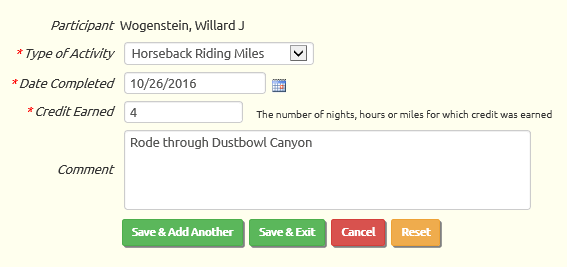 Click on Add Credit For Other Activity to add credit for an activity that was not a troop event.
Select the type of credit from the drop down list. Your choices will include:
- Camping Nights
- Cabin Camping Nights
- Service Hours
- Conservation Service Hours
- Hiking Miles
- Backpacking Miles
- Cycling Miles
- Paddling Miles
- On The Water Miles
- Horseback Riding Miles
- Motorboating Miles
- Skating Miles
Enter the date on which the credit was earned.
The Credit Earned is the number of nights, hours, or miles that were earned at this activity.
Use the Comment field to provide a description of the actiity.
Click Save & Exit to save your work.
Camping nights that are recorded here will contribute to this scout's total for Order of the Arrow eligibility and
Camping Merit Badge camping nights.
If the number of nights is less than 5, they will contribute to short-term camping nights. If the number of nights is 5 or more, they will contribute to the long-term camping nights.
Service hours that are recorded here will contribute to this scout's total service hours for completing the service requirements for Star and Life.
You can also add Other Activity credits from the Credit For Other Activity page, which gives you the option of uploading the credits from a CSV file.
If your troop is just making the transition to TroopWebHost, you may want to create Other Activity entries for credit earned prior to the transition. If you do this, do not
enter Camping Nights as one lump sum entry, as the entire amount will be counted as one long term campout if it is 5 nights or greater.
You may click on any other tab heading at the top of the rank summary page to view the requirements for that rank.

When you click on a tab the system will save everything you've entered on the current page.
For each rank, the system provides a complete description of each rank requirement.
For Star, Life, and Eagle, the system will automatically complete requirement #3 when the requisite number of
merit badges have been earned for that rank.

At the bottom of each page is another set of tabs. These will take you to other Advancement pages for this scout:
Click on the tab to go to the corresponding page.